
How to Use Our Free Slideshow Length Calculator
One of the most common questions people ask when planning a slideshow is:
How long should my slideshow be?
It sounds simple, but once you start gathering photos and choosing music, the timing can get tricky. You may wonder how many songs you need, how long each photo should stay on screen, whether your captions will be readable, or whether the finished video will feel rushed, slow, emotional, upbeat, or just right.
That is why we created the Milestone Slideshows Slideshow Length Calculator.
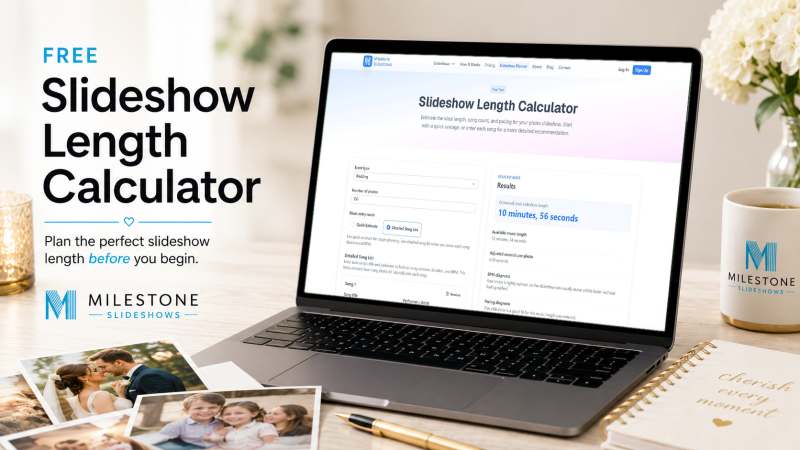
Our free calculator helps you estimate the ideal slideshow length, song count, photo pacing, music timing, and overall feel before your slideshow is created. Whether you are planning a memorial slideshow, birthday slideshow, anniversary slideshow, graduation slideshow, wedding rehearsal dinner slideshow, or family tribute video, this tool gives you a smarter starting point.
Why Slideshow Length Matters
A slideshow is more than a collection of photos. It is a story.
When the timing is right, the photos, music, captions, and transitions work together. Viewers have enough time to enjoy each image, read the captions, feel the emotion, and stay connected from beginning to end. For a deeper look at why timing can make or break a video, see our guide on why slideshow pacing matters.
When the timing is off, the slideshow can feel awkward.
If the photos move too quickly, important moments may fly by before people have a chance to take them in. If the photos stay on screen too long, the energy can fade and the video may feel slower than intended.
The right slideshow length depends on several things:
- The number of photos
- The number of songs
- The length of each song
- The tempo of the music
- The number of captions
- The type of event
- The mood you want to create
That is where the calculator helps.
What the Slideshow Length Calculator Does
The Slideshow Length Calculator gives you a helpful estimate based on the information you enter.
It can help you determine:
- How long your slideshow should be
- How many songs you may need
- How many seconds each photo should stay on screen
- Whether your music length is enough for your number of photos
- Whether your slideshow may feel rushed or too slow
- How captions affect the overall timing
- How the tempo of your music may influence the feel of the video
It is especially helpful when you are still planning your slideshow and want to avoid guessing.
Instead of wondering whether three songs are enough for 150 photos, or whether one song can support a short memorial tribute, the calculator gives you a clearer answer before production begins.
Step 1: Choose the Event Type
Start by selecting the type of event you are creating the slideshow for.
Different events usually need different pacing.
A memorial slideshow often feels best with a slower, more thoughtful pace. A birthday slideshow may call for more energy. A graduation slideshow may feel exciting and celebratory. A wedding rehearsal dinner slideshow may need a blend of humor, emotion, and storytelling.
Choosing the event type helps the calculator understand the general tone of your slideshow.
Step 2: Enter the Number of Photos
Next, enter how many photos you plan to include.
The number of photos is one of the biggest factors in determining slideshow length. A slideshow with 40 photos will feel very different from a slideshow with 150, 250, or 400 photos.
As a general rule, more photos require either more music, faster pacing, or a longer slideshow. If you have a large number of photos but only one song, each photo may need to appear very quickly. That can make the slideshow feel rushed.
The calculator helps you catch that before the video is created. For help deciding which images to include, see our tips on preparing pictures for a slideshow.
Step 3: Choose Quick Estimate or Detailed Song List
The calculator gives you two ways to work with music: Quick Estimate and Detailed Song List.
The Quick Estimate option is great when you just want a general idea. You can enter the approximate number of songs and average song length, and the calculator will estimate the timing from there.
The Detailed Song List option gives you a more customized result. In this workflow, you enter the song title and performer, and the calculator automatically adds the song duration and BPM for you.
That means you do not have to look up song lengths or tempo information yourself. The calculator can use the actual song duration and tempo to help estimate your slideshow length, pacing, and overall feel more accurately.
This is especially helpful when you already know the songs you want to use. For example, if you are creating a memorial slideshow and have three meaningful songs selected, the Detailed Song List workflow can help you see how those songs work with your number of photos and captions.
Step 4: Review Song Duration and Music Length
Music controls the emotional rhythm of a slideshow.
The total length of your selected songs helps determine how much time is available for your photos. If you have 100 photos and 10 minutes of music, the slideshow will feel very different than if you have 100 photos and only 4 minutes of music.
The calculator compares your available music length with your number of photos and desired pacing.
This helps answer an important question:
Do I have enough music for the slideshow I want to create?
If the calculator shows that your music length may be too short, you have several options. You can add another song, reduce the number of photos, choose a faster pace, or allow the slideshow to run longer.
Step 5: Let BPM Help Guide the Feel
BPM stands for beats per minute. It describes the tempo of a song.
A slower song usually feels better with longer photo holds and more gentle pacing. A faster song can often support quicker cuts and more movement.
In the Detailed Song List workflow, the calculator automatically adds the BPM when you enter the song title and performer. This helps the calculator better understand the energy of your music.
That does not mean every photo has to cut exactly to the beat. A beautiful slideshow still needs storytelling and judgment. But BPM gives the calculator another helpful clue about whether your slideshow may feel slow, balanced, energetic, or rushed.
Step 6: Enter Your Caption Count
Captions can make a slideshow more personal and meaningful.
You may want to include names, dates, locations, short messages, quotes, or descriptions. These details can add a lot to the story, but they also need enough screen time to be read comfortably.
If captions appear too quickly, viewers may miss the words and the photo.
The calculator takes captions into account when estimating pacing. This helps create a more comfortable viewing experience, especially for slideshows with written details or family history.
Step 7: Choose Your Desired Pacing
Finally, choose the pacing style you want.
A slower pace can feel emotional, reflective, and elegant. This often works well for memorials, anniversaries, and legacy-style family videos.
A balanced pace works well for many slideshows because it gives viewers enough time to enjoy the photos while still keeping the video moving.
A faster pace can feel upbeat, fun, and energetic. This can work well for birthdays, graduations, parties, and celebration videos.
The calculator uses your pacing preference along with your photos, songs, captions, song durations, and BPM to create a helpful estimate.
Understanding Your Results
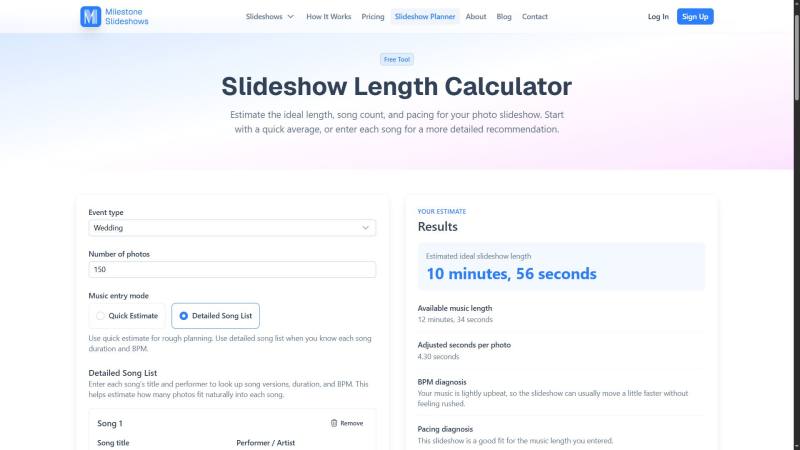
After you enter your information, the calculator gives you a practical slideshow timing recommendation.
You may see details such as:
- Estimated ideal slideshow length
- Available music length
- Recommended seconds per photo
- Suggested song count
- Pacing diagnosis
- BPM diagnosis
- Notes about whether the slideshow may feel rushed or too slow
These results help you make better decisions before production begins.
For example, if you enter 180 photos and only one song, the calculator may show that your slideshow could feel rushed. That does not mean your plan is wrong. It simply means you may want to adjust something before editing starts.
- You could add another song.
- You could remove some photos.
- You could use faster pacing.
- You could create a longer slideshow.
The calculator helps you see those choices more clearly.
A Planning Tool, Not a Strict Rule
Every slideshow is different.
Some photos deserve more time. Some moments are best shown quickly. Some songs have long intros or endings. Some captions need extra breathing room. Some events call for a quiet emotional tone, while others need energy and celebration.
The Slideshow Length Calculator gives you a strong planning estimate, but it does not replace creative judgment or professional editing.
That is where Milestone Slideshows can help.
We use photo order, music, pacing, captions, transitions, and emotional timing to create a polished slideshow that feels natural from beginning to end. See how it works to learn more about our process.
Try the Free Slideshow Length Calculator
If you are planning a slideshow, try the calculator before you begin.
It can help you avoid one of the most common slideshow mistakes: trying to fit too many photos into too little music.
Use it to plan your memorial slideshow, birthday slideshow, anniversary slideshow, graduation slideshow, wedding rehearsal dinner slideshow, or family tribute video.
Try the free Slideshow Length Calculator here.
When you are ready, Milestone Slideshows can help turn your photos, music, and memories into a beautiful finished video your family will treasure.
Ready to get started? See our pricing or contact us today.